Monitoring and logging
Monitoring and logging
A big advantage of ADIB is that ALL data transformation streams (regardless of which instance/server) converge at a central point: monitoring
Click on this menu item to see the status of each individual job - regardless of which instance.

You can easily filter for an instance (e.g. PROD system) or for a job in the upper area.
The individual lines (in our case with a green background) correspond to the execution of a job. This overview shows you in detail
- Job name
- Date of execution (start time)
- Duration of the job
- Instance on which the job was run (in our case "PROD")
- The color of the bar. Here means
- green : Job was executed without problems
- yellow : There are warnings (however, all steps of the job have been executed)
- red : There are problems (the job was not completed)
- blue : The job is currently running
- gray : No reliable information regarding the execution was returned
- This case can occur if the instance (i.e. the server in the customer's network) cannot establish a connection to the CentralStation.
- This is usually not a problem because the data exchange is carried out completely independently of the CentralStation.
After clicking on such a bar, the list of steps that were executed during the job opens.
 In this display you see the steps, their execution status (the colors have the same meaning as for the jobs) and the start time and duration.
If you now click on a step, you will receive detailed information about the step, e.g. the number of data records transferred.
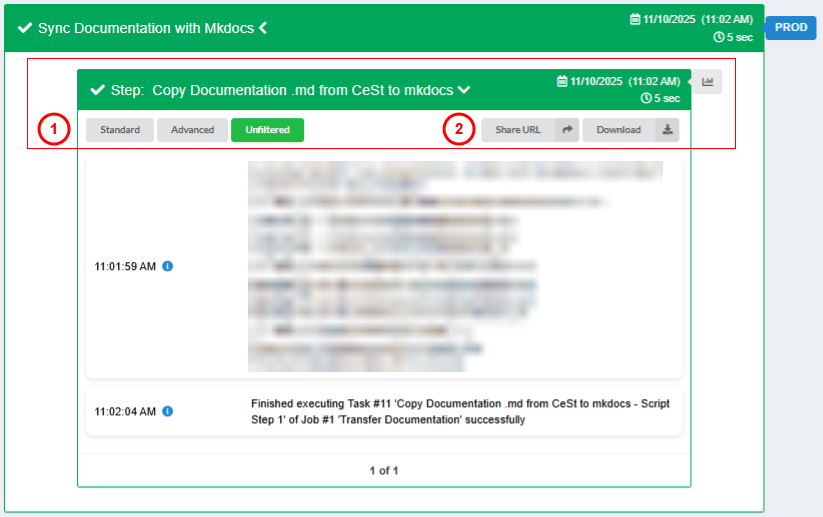 Users can move through standard, advanced and filtering options. Additionally, users can share this URL with another ADIB user, or download the provided log.
Please note that the information in the step details differs depending on the source-destination and ws module used.
This detailed view provides important insights, especially in the event that a job/step could not be executed successfully.
An example for this:
The job shown did not run successfully.
After opening, you can see the problem, which is due to the 4th step.

Thus, it is very easy to identify and fix problems.
In addition to this monitoring, ADIB offers many other logging functions that can be activated
- Details of the transferred data
- This is useful if you need to check in detail which data has been transferred
- Details about changes made to the configuration
- All relevant changes to the configuration of jobs, steps, step parameters and step position are logged.
- This makes it easy to find out later who made which changes and when.