Instances and dashboard
Instances and dashboard
Instance
An “instance” in ADIB corresponds to an IntegrationClient. The IntegrationClient performs the data exchange tasks configured in CentralStation. The use of instances offers the following advantages
- Use of multiple (possibly globally distributed) servers to perform data exchange (interface)
- You can decide which interface should run on each instance
- Separation between the systems to distinguish between development, test, release, and production systems
Dashboard
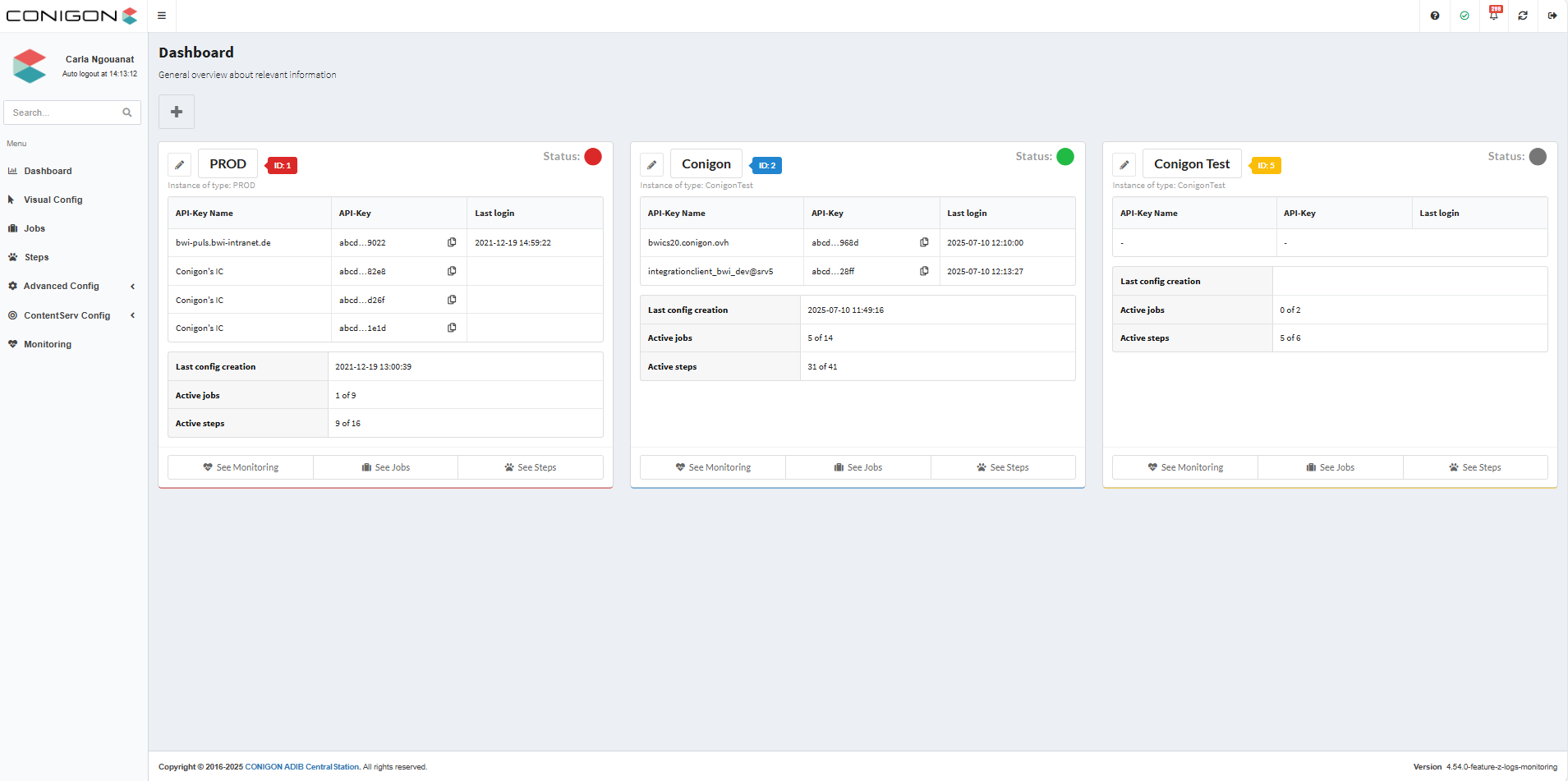
The dashboard shows the current status of the instances you are using:
- Status: active (green) or inactive (gray or red)
- An instance that has not connected to CentralStation for more than 10 minutes changes to yellow status.
- An instance that has not connected to CentralStation for more than 60 minutes changes to red status.
- Last login: Time at which the instance last connected to CentralStation.
- Last config file creation: Time at which the instance last retrieved an updated configuration.
- Active jobs / Active steps: Number of currently active jobs or steps.
The dashboard also gives you direct access to monitoring (of the interfaces) and configuration of the jobs or steps.